
In one of our recent projects, we used Adobe Presenter to create some course material and quizzes based on PowerPoint slides. This actually works very well, but one thing bothered me: the “interface” of the course or quiz is sometimes shown in a different language. We are talking about these texts:

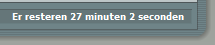
I was wondering how you could “force” it to be in one language, and what was the logic behind it. This is what I found out:
- the language you get in the interface is based on the Regional Settings of the pc you display the content on. So NOT on the language settings of your browser (which seems more logical to me). This is an issue in Belgium as we have French (Belgium) and Dutch (Belgium), and not every computer is configured correctly.
- the text is only modified if your regional settings are set to one of these languages: German, French, Korean, Japanese, Portuguese, Spanish, Italian, Simplified Chinese, or Dutch. In all other cases, English is shown.
- you can customize this text by creating a custom theme with the Theme Editor for your project. Consult the Adobe Presenter help pages for the correct procedure.
And this last topic gives you a possible solution for a “fixed” language: if you set the labels for all languages to the same language, you have your uni-lingual interface. That’s a lot of copy-pasting, but it works!