
Source unknown. HT @lesleyarens
The future of Training is Learning

Source unknown. HT @lesleyarens
People are often asking me if I can recommend good study material about Adobe Captivate 7. Of course, there is a lot of “free” material available on the web, especially from the Adobe site, but it is not always easy to get a full, structured overview of what is the best way to use the program to its full potential.
Recently, I had the opportunity to review Adobe Captivate 7 for Mobile Learning, written by Damien Bruyndocnkx. The title indicates that the book was written with a specific focus on the use of Captivate for Mobile Learning, but it is also a good introduction for people who are just getting started with the program and want to create animations and simulations that will just be published to pc. If you are creating e-learning content today, it is in your best interest to go directly for a “mobile-friendly” format, as you will get the question anyway to make your content available on iPad or other devices.
The book is really “hands-on”, with practical step-by-step exercise and does not just explain the features of the program, but teaches you the optimal “workflow” to produce Captivate content. This is what makes this book stand out from some others that are just explaining what the different buttons in the program do.
The book is available in e-book and paper format. Table of contents and sample chapters are available.
Recently, we ran into an issue with a piece of Captivate 6 content in our LMS. Although the content did not contain any quizzes, the content sent a score of 0 to the LMS, messing up the reporting.
We had a look at the reporting settings in Captivate, these were the settings used:
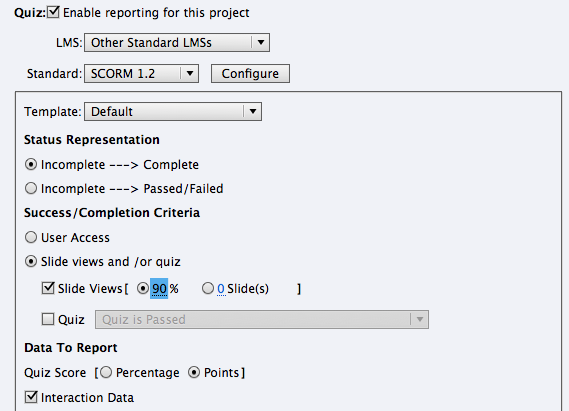
If you use these settings, the content communicates the following to your LMS:
[2013-06-16 09:15:49] LMSSetValue(“cmi.core.score.raw”, “0”)
[2013-06-16 09:15:49] LMSSetValue(“cmi.core.score.max”, “0”)
[2013-06-16 09:15:49] LMSSetValue(“cmi.core.score.min”, “0”)
Strangely enough, the solution is very simple: under Data to Report, you change the option Quiz Score to Percentage. This stops sending cmi.core.score values to the LMS. You would expect that this setting has no importance because you specified that you do not want to track the Quiz, but it does make a difference.
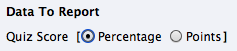
I have noticed exactly the same behaviour in Captivate 7.