
Adobe Captivate and SharePoint Learning Kit

The SharePoint Learning Kit is a lightweight LMS module that can make your SharePoint site a mini-LMS. Especially together with Windows SharePoint Services, it is a very cost-effective way to distribute e-learning content in your organisation with a minimum of “tracking”.

Of course, you do not get the very detailed reporting a true Learning Management System offers, but you can track progress (not attempted, in progress, completed), track score of a test, assign learning content to users or usergroups, and grade tests manually. Your content needs to be SCORM-conformant, as the SLK uses the SCORM API for communication between content and LMS.

The SharePoint Learning Kit is a feature that needs to be deployed on your farm, assigned to a web application, and gives you a feature that you can activate on a site level. It includes an “assignment” web part that instructors and learners use to assign, follow and grade content.
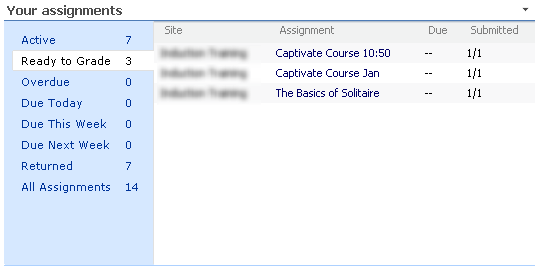
I had some trouble getting Adobe Captivate content to communicate with the SLK, I did not get the scores from a test. Finally, I found this article. In the .HTM file that is generated by Captivate, you can tune and tweak some scorm parameters. Changing var g_intAPIOrder = 0; from 0 to 1 does the trick for the SLK.
Microsoft releases Learning Content Development System

Microsoft released a free community edition of its e-learning authoring tool, called LCDS. They will not get the creativity award for the name of the product, but after a first look, the tool seems very useful.ย 

Some highlights:

  • runs on Windows XP and Vista (needs to be run as administrator), requires .Net framework 2.0
  • development is “template-based” according to the traditional instructional design (read, watch, interact, tryp, play)
  • supports multiple languages (including Dutch, yes!)
  • creates native SCORM 1.2 compliant content by default
  • includes a “player” for stand alone viewing outside an LMS
  • interactions, simulations can be created in Flash and… Silverlight, what were you thinking ๐Ÿ™‚

I followed quite some e-learning courses on the Microsoft Learning platform, and they were probably created with this tool. Very consistent, not very Flashy, but clear, concise and to the point. My kind of courses ๐Ÿ˜‰ย 

I hope to get some time soon to create a course, and share it with you. “Brandjes blussen, the sequel” (inside joke…)

Find your way in the Office 2007 ribbon

My colleague Johan pointed me to some interesting Microsoft tools that make the migration towards Office 2007 (and its new Ribbon) much easier.

If you knew where a certain feature was located in 2003 (e.g. in Tools, Options), you can either use an interactive guide that really shows you where it is in 2007, or you can use an Excel reference file to look it up.

Have a look atย https://support.office.com/en-US/article/Reference-Locations-of-Word-2003-commands-in-Word-2007-154D4788-DA09-4818-B7E3-163B0F98D34B

Microsoft introduces “learning snacks”

To promote their new Windows 2008 server, Microsoft announces the availability of learning snacks. A learning snack is a short module that illustrates one specific topic or learning objective. Of course, Microsoft uses Silverlight as the underlying technology.

Have a look yourself on the Windows 2008 learning portal (click the Learning Snacks tab). Microsoft uses very simple, but effective interactions: mouse-overs, software demonstrations, click-to-reveal-more, …

What I like about it:

  • simple but very nice layout
  • good performance
  • easy to navigate interface

What I do not like about it:

  • voice-over quality is not consistent: sometimes good, sometimes very bad;
  • it does not work on my Mac. There is a Silverlight version for Mac, but the learning snack player does not seem to load the content, not in Safari, not in Firefox;
  • clicking on some of the links is blocked by the IE popup blocker (althoug it seems to be a simple hyperlink)

Still a great initiative. Wouldn’t it be nice if this Silverlight player could load SCORM manifests? What if Microsoft made it freely available? Wouldn’t that be a great promotion for Silverlight?

A great view on business

The people from Common Craft have introduced a new concept of explanation. With their concept called Paperworks, they explain difficult concepts in “Plain English”. They have been all over the learning blogs in 2007, because of the simplicity and the effectiveness of the idea.

They do not only have a great concept, but also great ideas about how to do business today. I recommend everyone to read their 15 Lessons Learned in 2007.

My favorites?

  • Simple is better
  • Constraints facilitate creativity
  • Give it away
  • Be Authentic, genuine and legitimate

Makes you think!