
View
The future of Training is Learning



 Everybody who has ever migrated to a new hosting provider, purchased a new domain name or made DNS changes has done it: adding lines to your hosts file to “hard code” the ip address of a server host name on the workstation you are working on.
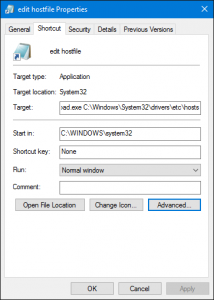
On Windows, this has become a pain since the UAC feature was introduced. In order to modify, you need elevated permissions, so you need to start your favorite text editor as administrator. On top of that, the file is buried somewhere in the deepest cave of your c-drive (C:\Windows\System32\drivers\etc\).
There must be an easy way to do this. I managed to reduce it to two clicks via a shortcut on my desktop, with the procedure below. Who can do better? One click only?
Seems to be a lot of work, but it will save you numerous clicks whenever you need to edit the file again.