
I wanted to run Home Assistant in a virtual machine on a Synology 925+ NAS. The instructions on the HA site are for the docker version and don’t give any specific details for the built-in virtualisation tool of Synology (Virtual Machine Manager) so here is the config that worked for me:
- Navigate to https://www.home-assistant.io/installation/alternative/ and download the .ova image
- On your Synology, open Virtual Machine manager
- Select Virtual Machine, don’t click Create but Import
- Select Import from OVA files
- Select the .ova file you just download (stored on your pc or on the NAS)
- Select the storage of your choice
- Select the following options for the General specifications
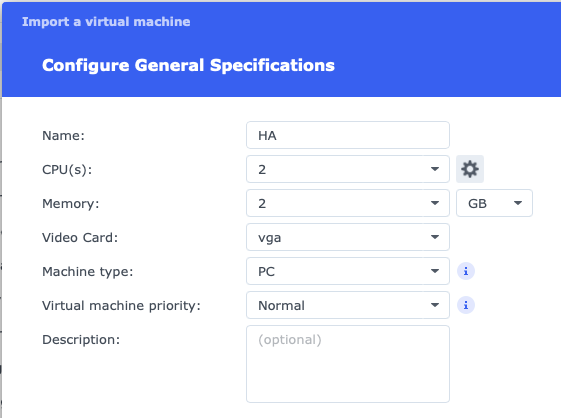
- Select the size of your disk (I kept the proposed 32 GB)
- Select your desired network settings (I kept the default)
- In the Other settings screen, make sure to select UEFI for the Firmware setting. Leaving it on Legacy BIOS made the machine hang on boot for me
- Select the user(s) that will have management permissions on your virtual machine
- Review the settings and finish the import