
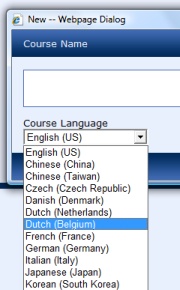
 Someone asked me if it would be possible to add a new language to the available language packs of the Microsoft Learning Content Development System. Well, as the system supports already multiple languages, that should not be that difficult. This is what I did (use at your own risk!):
- Navigate to C:\Program Files\Microsoft\Learning\LCDSc\application\viewer. This folder contains a subfolder, one for every available language.
- Copy the folder that corresponds most to the language you want to create. Or if no correspondence, copy any folder and give it a three letter language code.
- Inside your new folder, go to the folder named shared. Inside that folder, there is a folder with the same language code, rename that to your new code.
- Inside that folder, there is a file version.xml. Edit the file in Notepad and make the necessary changes.
- Open the viewer folder inside that folder.
- The file viewerstrings.js contains the different language strings for the viewer. Edit the file in Notepad and translate.
- The Help and appart folder contain the help screens. Translate these if necessary.
- Go back to C:\Program Files\Microsoft\Learning\LCDSc\application and edit the supportedLanguages.xml file with notepad. Copy one of the lines to add a new line for your language.
Done! The new language should appear when creating a new course!